Settings
 Fast Delivery
 Free Shipping
 Incoterms
 Payment Types


 Marketplace Product

How Hardware Gets Hacked (Part 4): Memory Protections
2026-05-20 | By Nathan Jones
Where did we leave off?
In the previous article, I discussed how to take the perspective of an attacker: identifying the attacker-controlled inputs that could be manipulated to exploit a vulnerability and achieve a payoff.

💡 Let's now apply that mindset to our own device.
Reflecting on the code we have now for our car and key fob device, what are some possible attacks that opposing teams could conduct in order to extract our flags? Record at least three ideas on a piece of paper or in a text document before moving on. A simple way to evaluate which attack to attempt first is to plot our ideas along two criteria/axes, either as a two-dimensional graph or a two-column table.


We'd be smart to start with attacks in the upper right-hand corner of our graph, as they have the highest chance of success and are the easiest to conduct.
🤔 Rank your ideas now.
Rank the ideas you came up with in the first question above, either using a graph or a table.
If you skipped over the first question in this article (what?!), here are some possible ideas that you can evaluate for their difficulty and likelihood of success.
- Send an "unlock" command to a car from a serial adapter connected to our computer
- Unlock a car using the fob for Car #0
- Bombard the car's serial port with serial data to overwhelm the code, causing a fault that dumps the flags
- Connect to the device's debug port and read the flags out of memory
- Send serial data to the car that overwrites the receive buffer, causing the car to execute a call to uart_write with the memory address of the flags
Which attack would you start with?
With the current system design, it's my conclusion that the easiest way to "unlock" a car or "enable" a feature is to read out those flags over an unlocked debugging port!
❗️ Don't make this mistake!
Reading memory off the device is only actually the easiest attack because the competition binaries were encrypted, and they were only decrypted by the MITRE bootloader in the act of flashing it to a competition board. If the binaries were instead given out unencrypted, then the easiest attack would actually just be to read the data straight out of the binary! The first defensive lesson is actually this:
Never give your attackers access to unencrypted data that contains sensitive information (such as flags or secret keys). If you need to distribute programs to your customers but don't plan on implementing a bootloader to decrypt your encrypted program (as in the competition), then you must find other means of obfuscating your sensitive information, such as encrypting just your secrets in flash and only decrypting them at run-time.
Attack #1: Read out memory over JTAG/SWD
In this attack, we’re simply going to start a debug session with our target board. The flags are stored at known locations in memory, so all we need to do is read out that memory to get the flags.
Reading memory like this gives us access to every flag for every attack scenario: the unlock flags for Cars #1-5 and the feature 2 flag for Car #5.
STM32
📝 NOTE: In my first implementations, the flags for the STM32 were not previously at a defined location; they were merely local to the loadFlag function. To mimic the competition setup, this was changed so that the flags were stored at a defined place in flash memory. A section of flash (sector 6; starting address 0x08060000) was set aside in the linker script, and a struct containing all of the flags placed there. This way, all flags on the STM32 are now located in the 256 bytes starting at the beginning of sector 6, 0x08060000.
Since the flags are stored in flash on the STM32, the steps for this attack are the same as if you were just debugging the device yourself:
- Start a GDB server connected to the device.
- Start GDB (gdb-multiarch) or gdbgui.
- Print all flags (The x/256cb demonstrated in the example code tells GDB to print 256 character bytes [cb] beginning at the memory address that follows the e[x]amine command.)
Ex:
$ ./tools/openocd.py debug stm32 {serial_num}
# In a separate window:
$ gdbgui -g "gdb-multiarch -ex 'target remote localhost:3333'"
(gdb) x/256cb 0x08060000
0x8060000 <flags_data>:         100 'd' 101 'e' 102 'f'97 'a'   117 'u' 108 'l' 116 't' 95 '_'
0x8060008 <flags_data+8>:       117 'u' 110 'n'108 'l'  111 'o' 99 'c'  107 'k' 0 '\000'       0 '\000'
0x8060010 <flags_data+16>:      0 '\000'       0 '\000' 0 '\000'        0 '\000'        0 '\000'0 '\000'        0 '\000'        0 '\000'
0x8060018 <flags_data+24>:      0 '\000'       0 '\000' 0 '\000'        0 '\000'        0 '\000'0 '\000'        0 '\000'        0 '\000'
0x8060020 <flags_data+32>:      0 '\000'       0 '\000' 0 '\000'        0 '\000'        0 '\000'0 '\000'        0 '\000'        0 '\000'
0x8060028 <flags_data+40>:      0 '\000'       0 '\000' 0 '\000'        0 '\000'        0 '\000'0 '\000'        0 '\000'        0 '\000'
0x8060030 <flags_data+48>:      0 '\000'       0 '\000' 0 '\000'        0 '\000'        0 '\000'0 '\000'        0 '\000'        0 '\000'
0x8060038 <flags_data+56>:      0 '\000'       0 '\000' 0 '\000'        0 '\000'        0 '\000'0 '\000'        0 '\000'        0 '\000'
0x8060040 <flags_data+64>:      100 'd' 101 'e'102 'f'  97 'a'  117 'u' 108 'l' 116 't' 95 '_'
0x8060048 <flags_data+72>:      102 'f' 101 'e'97 'a'   116 't' 117 'u' 114 'r' 101 'e' 49 '1'
0x8060050 <flags_data+80>:      0 '\000'       0 '\000' 0 '\000'        0 '\000'        0 '\000'0 '\000'        0 '\000'        0 '\000'
...
TM4C
On this device, the location of the flags was set by the competition’s Technical Specifications (section 1.4.3).
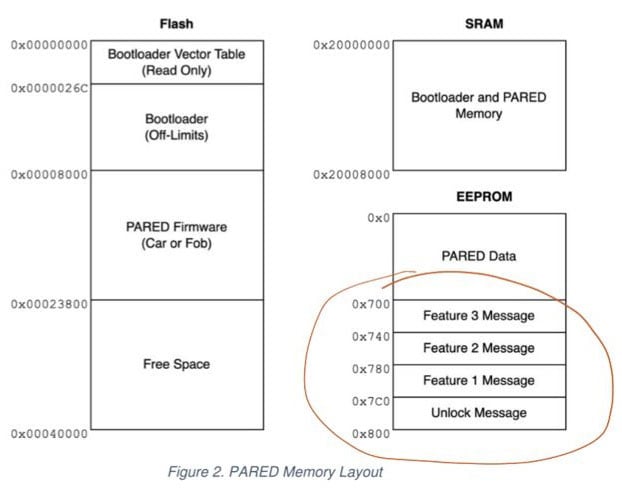
However, the EEPROM can't be read directly from GDB (since it's not part of the memory space), but it can be read using the EEPROM controller peripheral on the TM4C. This is done by setting the EEBLOCK and EEOFFSET registers appropriately and then reading data (32 bits / 1 word at a time) out of EERDWR (or EERDWRINC).
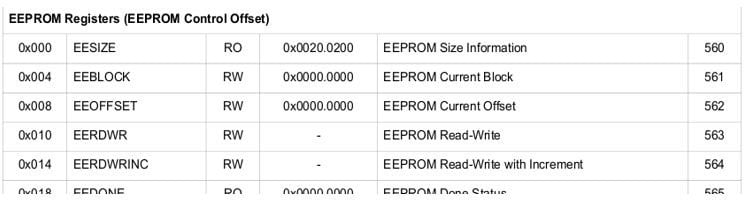
Following the code in EEPROMRead() from the Tivaware library (in eeprom.c), I had Claude help me write a TCL script that OpenOCD can easily invoke to read an entire section of EEPROM in one go. You can run it like this.
- Start a GDB server connected to the device.
- Connect via telnet in a separate window.
- Load eeprom.tcl and run eeprom_read, giving it a file name (to put the data), the starting address in EEPROM, and the number of bytes to read.
Ex:
$ ./tools/openocd.py debug tm4c {serial_num}
# In a separate window
$ telnet localhost 4444
> halt
> script tools/eeprom.tcl
> eeprom_read flags_dump.bin 0x700 256
We can then inspect the contents of our file using hexdump.
$ hexdump -C flags_dump.bin
00000000  64 65 66 61 75 6c 74 5f  66 65 61 74 75 72 65 33  |default_feature3|
00000010  00 00 00 00 00 00 00 00  00 00 00 00 00 00 00 00  |................|
*
00000040  64 65 66 61 75 6c 74 5f  66 65 61 74 75 72 65 32  |default_feature2|
00000050  00 00 00 00 00 00 00 00  00 00 00 00 00 00 00 00  |................|
*
00000080  64 65 66 61 75 6c 74 5f  66 65 61 74 75 72 65 31  |default_feature1|
00000090  00 00 00 00 00 00 00 00  00 00 00 00 00 00 00 00  |................|
*
000000c0  64 65 66 61 75 6c 74 5f  75 6e 6c 6f 63 6b 00 00  |default_unlock..|
000000d0  00 00 00 00 00 00 00 00  00 00 00 00 00 00 00 00  |................|
*
00000100
🔨 Your turn!
If you have one of the STM32 or TM4C development boards, pull it out now and execute this attack! Don't worry, I'll wait. 😉
So, how do we stop it?
Let's brainstorm how we might defend against this attack. Keep in mind that the exact steps for the attack are as follows.
 https://www.playembedded.org/blog/debugging-stm32-chibistudio/
- Connect a debug adapter to the programming pins on the device.
- Start a GDB server.
- Send commands (via GDB) to the debug controller on the device to read a section of flash or EEPROM memory.
- The debug controller reads the indicated memory locations and returns the data to the debug adapter, which delivers it to GDB.
Preventing any of those steps halts the attack.
🤔 Your turn!
Brainstorm a few ways you could prevent that attack. Don't stop until you have at least five (no matter how crazy they are!). Write them down in your notes.
What did you come up with? You may have come up with a number of attacks that are completely viable for real devices but not exactly suitable for the eCTF competition, such as the following.
- Add tamper-protection to the device, disabling the device entirely if it detects someone attempting to open the enclosure or attaching to the debug port.
- Use a microcontroller in production that has no debug port; the program is baked into the silicon at manufacturing.
- Use a proprietary debug adapter or debug protocol.
If so, I applaud you! These are all great ideas, and though we can't exactly implement them for the eCTF competition, they are excellent to keep in mind for production devices.
Did you think at any point, "Surely there must be a way to disable the debug port in production!?"

There are many security mechanisms that modern microcontrollers provide to developers, though they vary widely by manufacturer and device. Here's what's available on our two devices.
STM32
- Three levels of read protection (RDP) (See section 3.6.3 of the reference manual for more info.)
- At RDP 0, the device is fully open.
- At RDP 1, all flash memory accesses (read, write, erase) trigger a BusFault if a debug adapter is attached.
- Note: A debugger can still be attached, and the debugger can still read/write the core processor registers and RAM.
- At RDP 2, flash memory access is prohibited when a debug adapter is attached (as at RDP 1), and a few other protections are also enabled (user option bytes cannot be altered, cannot boot from RAM or system memory bootloader, etc.)
- Importantly, setting RDP to level 2 is permanent and cannot be undone.
- Prevents all flash data from being read, including by the CPU. Any debug access to flash or any LD instructions being executed by the program is/are prevented.
- Can be enabled/disabled for any of the flash sectors on the STM32 (sectors 0-7 for the STM32F411).
- (Preventing even CPU reads from flash might not seem useful, but, critically, instruction accesses aren't blocked, so any constants that are baked into the instructions themselves can still be used. For example, this wouldn't work.
void getUnlockFlag(uint8_t* dest)
{
  memcpy(dest, flags_data.unlock, UNLOCK_SIZE);
}
but this would
void getUnlockFlag(uint8_t* dest)
{
  dest[0] = 'd';
  dest[1] = 'e';
  dest[2] = 'f';
  dest[3] = 'a';
  dest[4] = 'u';
  dest[5] = 'l';
  dest[6] = 't';
  dest[7] = '_';
  // ...
}
This feature could be used to create protected regions of flash, inside which critical cryptographic operations are allowed to run, but no data [like secret keys] ever really leaves.)
- Memory protection unit (MPU) (See section 4.2 of the programming manual for more info.)
- Can make certain sections of flash memory read-only, write-only, execute-only, or some combination of those.
TM4C
- EEPROM locking and hiding (See section 8.2.4.1 of the datasheet for more info.)
- Both individual blocks and the entire EEPROM can be locked with a password, preventing either reads or writes or both until the correct password is entered.
- Every block except block 0 can also be temporarily hidden, meaning code cannot access that block for reading or writing until a reset (or until the block is explicitly unhidden).
- These protections are most useful for preventing accidental accesses to the EEPROM, but they don't really constitute a good defense against attackers, at least not by themselves. This is because our attackers have access to both our source code and, unless it's been disabled, the debug port on our microcontroller. The EEPROM password can be easily discovered this way, and "hidden" EEPROM blocks can easily be unhidden. Relying on these for protection against an attacker is like locking the front door of your house and then placing the key on your doorstep.
- DBG bits of BOOTCFG register (See section 8.2.3.5. of the datasheet for more info.)
- Will disable the debug port if not set to 0b10.
- Flash memory protection read enable (FMPRE) (See section 8.2.3.2 - 8.2.3.4 of the datasheet for more info.)
- Acts similarly to the PCROP on the STM32: prevents all flash reads by a debug adapter or the CPU.
- Can be enabled on 2 kB-long blocks of flash memory (not EEPROM memory, though!)
- MPU (See section 3.1.4 of the datasheet for more info.)
- Similar to the MPU on the STM32.
⚠️ Potential Pitfall
Changing the debug pins to GPIO pins in the software is NOT sufficient to disable the debug interface!
Ex, for TM4C:
void change_debug_pins_to_gpio(void)
{
  // PC0=TCK/SWCLK, PC1=TMS/SWDIO, PC2=TDI, PC3=TDO/SWO on TM4C
  // 1) Enable clock to GPIO peripheral
  //
  SysCtlPeripheralEnable(SYSCTL_PERIPH_GPIOC);
  while (!SysCtlPeripheralReady(SYSCTL_PERIPH_GPIOC));

  // 2) Unlock Port C
  //
  HWREG(GPIO_PORTC_BASE + GPIO_O_LOCK)  = GPIO_LOCK_KEY;
  HWREG(GPIO_PORTC_BASE + GPIO_O_CR)   |= GPIO_PIN_0 | GPIO_PIN_1 | GPIO_PIN_2 |   GPIO_PIN_3;
  HWREG(GPIO_PORTC_BASE + GPIO_O_LOCK)  = 0;

  // 3) Set pins as input
  //
  GPIOPinTypeGPIOInput(GPIO_PORTC_BASE, GPIO_PIN_0 | GPIO_PIN_1 | GPIO_PIN_2 | GPIO_PIN_3);
  }
Although this prevents debug access after the pins became GPIOs, any debug adapter out there is capable of resetting the device (at which point the debug pins are reset to being debug pins again!) and then connecting before the pins are remapped in the firmware to something else. Remapping debug pins to GPIO pins gives you more GPIO pins; it doesn't give you any better security.
We could also simply make things more difficult for our attacker by implementing some or all of the following defenses.
- Disable debug info for production builds
- Hide the source code
- Hide any map files
- Don't let users build firmware to run on your device
- Encrypt the flags in flash and only decrypt them inside loadFlags after a successful unlock attempt
None of these will prevent an attacker from conducting the attack above on their own, but they can make it harder to successfully pull off.
Ultimately, we want to implement the defense that definitively stops this specific attack (and no others), while being no more complicated than is necessary. Ideally, the solution also doesn't brick our device, either. For me, that means we want to Disable the debug port using the DBG bits of BOOTCFG (TM4C) or by setting RDP to level 1 (STM32).
❓ Why don't we just implement all of the defenses??
Although adding protections from FMPRE/PCROP or the MPU seems like a good idea at this time, I would discourage you from implementing any defense unless you can demonstrate a realistic attack that that defense would help prevent (like we've done so far in this article). Adding additional defenses "because ... security" runs the risk of creating a defensive posture which itself is so complicated that we don't fully understand it, possibly introducing new vulnerabilities where those defenses interact in unanticipated ways. It may also simply eat up valuable development time if the attack you're trying to defend against isn't one you'd realistically even need to protect from.
You may have heard of TDD (test-driven development). In this article series, we're going to follow ADD: "attack-driven development"!
Defense #1: Disable the debug port
Locking
STM32
Enabling RDP 1 on the STM32 is very simple on OpenOCD, which exposes a command to do this exact thing: stm32f2x lock 0.
The STM32 requires a full power cycle (unplug the development board and plug it back in) for the new RDP settings to take effect.
TM4C
Disabling the debug port on the TM4C is only a hair more difficult. It essentially only requires clearing those bottom two bits of BOOTCFG (for which the microcontroller makes us write magic numbers to two other registers to prevent any accidental writes to BOOTCFG), but we have to do this manually in OpenOCD using mmw (memory modify word) and mww (memory write word) as there isn't a special command for it. (See section 8.2.3.10 of the datasheet for more info.)
The TM4C requires a hardware reset (pressing the reset button on the development board is fine) for the new BOOTCFG settings to take effect.
But did it work?
I've added both sequences to the openocd.py script, invoked using the lock subcommand.
./tools/openocd.py lock {stm32|tm4c} {SN}
I.e.
./tools/openocd.py lock stm32 0672FF495157808667174529
Lo and behold, it works! Once either device is locked, I either can't connect with GDB at all (TM4C; below top) or I can connect with GDB but I can't print any values from flash (STM32; below bottom).
TM4C
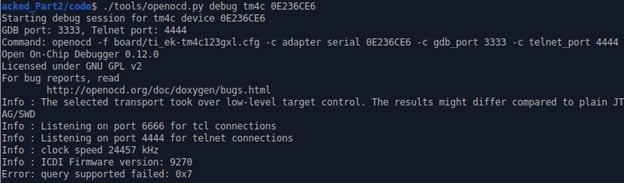
STM32

🤔 Are you satisfied?
Does this constitute proof that I've closed off the attack vector described above? What else, if anything, would you need to be confident that this defense does what it's intended to do? Jot down your thoughts before continuing on.
Unlocking
An unlocking procedure is required so that we don't accidentally brick our device. Luckily for us, performing an unlock procedure on both the STM32 and the TM4C concurrently conducts a mass erase of each device's memory, so an attacker can't extract any flags by unlocking a locked device.
STM32
Disabling RDP 1 on the STM32 is very simple in OpenOCD, using a variation of the command to enable RDP 1: stm32f2x unlock 0. I've added this sequence to openocd.py as the unlock command.
./tools/openocd.py unlock stm32 0672FF495157808667174529
Downgrading the RDP level from 1 to 0 will conduct a mass erase of the device's flash. Changes take effect immediately (no reset or power-cycle required).
TM4C
Re-instating the DBG bits in the BOOTCFG register of the TM4C is, unfortunately, a bit more complicated. Although OpenOCD does have the ability to do this (using the command stellaris recover), the OpenOCD driver for the debug adapter on the competition board (ti_icdi.c) fails to execute any OpenOCD command if it can't connect to the target device, which it can't if we've disabled the debug port! Luckily for us, all stellaris recover was doing was sending an unlock message to the ICDI debug adapter on the TM4C (which is literally "debug unlock", formatted as a GDB remote serial protocol [RSP] packet). We can send that message directly to the ICDI adapter ourselves with a little bit of work, bypassing OpenOCD entirely and its "buggy" ICDI driver.
I had Claude write the Python script to do this, called icdi_unlock.py. It only requires the TM4C's serial number to work.
./tools/icdi_unlock.py {SN}
I.e.
./tools/icdi_unlock.py 0E236CE6
As for the STM32, reinstating the debug port on the TM4C will conduct a mass erase of the device's flash, which also restores the FMPRE, FMPPE, and USER_REG registers to their default values. The TM4C requires a full power cycle (unplug the development board and plug it back in) for the new settings to take effect.
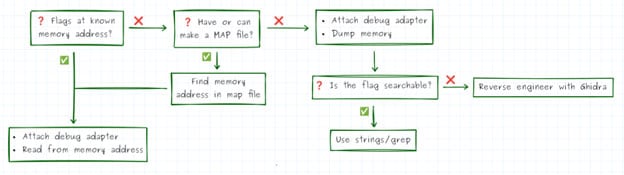
What if I'm looking for a variable in the future that isn't at a specific memory location?
This is an important question, since pinning a device's secrets to a specific memory location (and also publishing that location!) is definitely a "competition-ism". If we have debug access to a device but don't know exactly where on that device we want to inspect memory to find the secrets, we have a few options based on what other information we do have.
- Do we have or can we make a MAP file? If yes, then we can search the map file to find where our named variable was stored. Ex:
$ cat hardware/stm32/build/car_1234/STM32.map | grep flags
.flags          0x0000000008060000      0x100
*(.flags)
.flags         0x0000000008060000      0x100 hardware/stm32/build/car_1234/Core/Src/main.o
- If we don't have an ELF with debug info or a MAP file, then our last option is to dump the microcontroller's flash memory. We can do this either from inside GDB or directly using OpenOCD:
- In GDB use dump binary memory {FILE} {START} {END}. E.g., for STM32 (flash starts at 0x08000000 and is 512 kB or 0x00080000 long):
Copy Code
- In GDB use dump binary memory {FILE} {START} {END}. E.g., for STM32 (flash starts at 0x08000000 and is 512 kB or 0x00080000 long):
(gdb) dump binary memory flash_dump.bin 0x08000000 0x08080000
- In OpenOCD use dump_image {FILE} {START} {LENGTH}. E.g., for STM32:
$ openocd -f interface/stlink-v2.cfg -f target/stm32f2x.cfg \
-c "init" -c "reset halt" \
-c "dump_image flash_dump.bin 0x08000000 0x80000" \
-c "shutdown"
Now we need to do a little reverse engineering to locate our desired variable somewhere inside that binary. Here are a few ways you might do that:
- Is it possible the flags were stored as strings? Use the strings tool to print out all ASCII strings inside a binary file. Ex:
$ strings hardware/stm32/build/car_1234/flash_dump.bin
...
FpGdefault_unlock
default_feature1
default_feature2
default_feature3
...
- Do the flags all share a common sequence, like starting with "FLAG{" or "default_"? Use hexdump and grep to locate that sequence. Ex:
$ hexdump -C flash_dump.bin | grep default_
00060000  64 65 66 61 75 6c 74 5f  75 6e 6c 6f 63 6b 00 00  |default_unlock..|
00060040  64 65 66 61 75 6c 74 5f  66 65 61 74 75 72 65 31  |default_feature1|
00060080  64 65 66 61 75 6c 74 5f  66 65 61 74 75 72 65 32  |default_feature2|
000600c0  64 65 66 61 75 6c 74 5f  66 65 61 74 75 72 65 33  |default_feature3|
- As a last resort, you can load the flash dump into a decompiling tool like Ghidra to try to reconstruct the source code. Tools like that will often let you search for strings and string literals (like in the two bullets above) and also can point you to the memory address of your desired variable, assuming you can locate the right spot in the code where the variable is referenced. Ghidra is a powerful tool, though, and any further description of its use will have to wait for another article!
We can summarize these attack steps in the following flowchart.
Other chips and their defenses
Disabling the debug port and offering some kind of flash read protection are just two of many, many different ways that manufacturers can build security directly into the microcontroller's silicon. For protecting flash contents, other features can include:
- Flash encryption: Flash is encrypted at rest and only decoded during the actual instruction fetching/decoding. If an attacker reads flash, all they get is ciphertext. (Ex: Espressif ESP32, Renesas RA6/RA4, NXP LPC55S, ST STM32U5/H5)
- Debug authentication: The debug port can be locked with a password or certificate. Access is denied unless a debug adapter (presumably from an authorized developer or maintenance personnel) provides the correct password/certificate. (Ex: ST Micro STM32H5/U5, Nordic nRF53, Silicon Labs Series 2)
- Tamper detection (with secure key storage): "Tamper" pins on the microcontroller can be connected to a grounded enclosure such that their connection breaks open if the enclosure is opened, causing a small, designated area of memory to get immediately erased. (Ex: ST Micro STM32U5, NXP LPC55S)
Additionally, the following features have other useful security features that may be useful when we discuss more sophisticated attacks later on in this series.
- Secure boot: A ROM bootloader verifies the cryptographic signature of flash memory before executing code. Can prevent an attacker from modifying flash memory or uploading their own program and executing the modified code. (Ex: ST Micro STM32H5/U5/L5, Microchip SAM L11, Renesas RA6/RA4)
- Anti-rollback counters: Prevents loading older firmware versions. (Ex: NXP LPC55, Nordic nRF53)
- Physically unclonable functions (PUF): Hardware circuits that create unique cryptographic keys from tiny random variations in IC manufacturing. (Ex: NXP LPC55S, Silicon Labs Series 2, Renesas RA6/RA4)
Building a threat model
With our first round of attack/defense under our belt, we can formalize our new knowledge in a threat model. A threat model is a graphic that depicts a device's security posture and includes things like:
- who the expected attackers are
- what is being protected (i.e., the payoffs)
- which attacks a development team expects the attacker(s) to attempt
- which defenses have been implemented to thwart those attacks
- which attacks the team isn't protecting against
The last bullet is often forgotten, but defining it is important to avoid over-engineering your system. For instance, disabling the debug port doesn't stop an attacker from decapping our microcontroller and then using a scanning electron microscope (SEM) to read out the bits of our flags one by one.
 Peeling Back The Layers: How to Decap ICs and Spot Counterfeit Chips
However, non-destructively decapping an integrated circuit and then reading out individual bits is a highly skilled and highly expensive endeavor. We may note on our threat model that this is a possibility, but that we've decided that if a nation state wants our secrets and is willing to sink that much money and effort into the process, then they can have them.
There isn't a standard for drawing threat models, so we'll make our own.
- Each rectangle will represent a version of our code, identified by a commit number.
- Attacks will be shown as arrows, with a brief name and a list of flags that an attacker could capture when conducting the attack.
- Attacks will point to updated versions of our code with any pertinent defenses in place.
- The first time we encounter a defense, I'll also bring attention to the pitfalls in, and alternatives to, that defense.
- Attacks considered outside our anticipated attackers' scope (and therefore not defended against) are marked by the words --OUT OF SCOPE--.
Here's the threat model I developed after this first attack:
👤 Attackers
- Teams of 4+ high-school and college students
- Experience ranges from "hobbyist" to "graduating college senior, majoring in electrical engineering or cyber security"
- Students are likely participating in the competition either as an extracurricular activity or a 1-3 credit-hour course (e.g., each student likely spends 1-12 hours a week on developing the project)
- Teams are mentored by 1+ instructors, with experience ranging from "high school robotics or AP CS teacher" to "hardware security researcher"
- Budgets are likely small, but have access to labs (especially at the college level) with equipment costing possibly tens of thousands of dollars each, such as
- oscilloscopes,
- logic analyzers,
- power supplies,
- function generators,
- soldering stations,
- fault injectors, etc.
🔐 Secrets/Payoffs
- The value of the car unlock and feature flags
⚔️ Attacks (in- and out-of-scope) and 🛡 Defenses
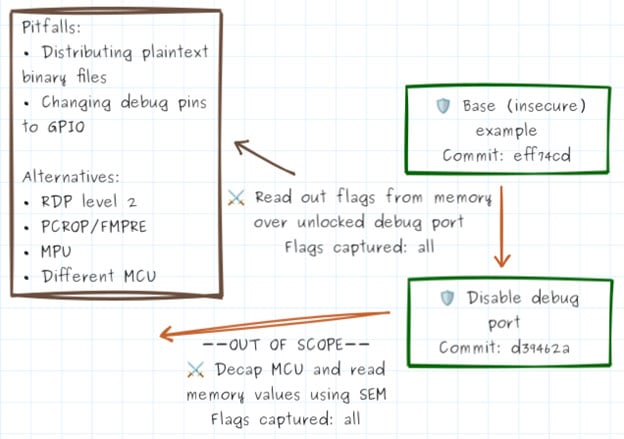
(Note: Navigate to the commit in question by appending the commit number to the URL www.github.com/nathancharlesjones/howHardwareGetsHacked/tree/<6-digit commit #>, i.e., www.github.com/nathancharlesjones/howHardwareGetsHacked/tree/d39462a)
💡 There, I fixed it
Disabling the debug port doesn't just close off that attack path; it might actually open up new ones! Take a minute to brainstorm how an attacker might get around our defense or what other attacks might now be possible.
🔍 Hints:
- Does this defense give the developers so much confidence that they're lax in their security of other parts of the system?
- Devices often still need to be accessed for maintenance or to program configuration settings during production, even after being locked. Is there an interface like that that could be exploited?
- Is there any way around the debug port being disabled?
☠️ One teeeeeny, tiiiny problem
It turns out that disabling the debug port can definitely be circumvented! See these references for information about researchers who've partially or fully succeeded in circumventing RDP protections on the STM32.
Some of these attacks are ones we'll probably see in future articles!
Conclusion
🤔 What do you want to remember?
Think of at least 3 things you want to remember after reading this article, and write them in your notes.
If nothing else, I'd ask you to remember this:
- NEVER distribute plaintext binaries that contain system secrets
- NEVER leave the debug port unlocked on a system that handles secrets
Doing either one gives up those secrets to anybody who can use strings or gdb. But using the protections on each of our microcontrollers (and by virtue of the fact that binaries were encrypted during the competition) shuts down those easy attacks.
So, what's our next attack??
If you've made it this far, thanks for reading and happy hacking!